Objective:
This blog is to share how to run highly available ActiveMQ cluster in Master/Slave configuration.
Introduction:
ActiveMQ broker(s) tends to be a core piece of messaging infrastructure in an enterprise. It is vital for this messaging infrastructure to be highly available and scalable. Please read this
link in order to learn more about creating network of brokers to support various use cases. One of the popular use case for ActiveMQ is the Master/Slave configuration with shared database. When this configuration is used, the message consumers and producers can operate without interruptions as they use ActiveMQ's connection factory with failover protocol. The failover protocol insulates the consumers and producers from having to deal with any potential downtime or application level reconnection logic when slave ActiveMQ node takes over to become the master which happens if the current master node goes down for any reason. I must caution that this configuration must not be used to mask any issues which take out the master node. We should iron out any causes that result in an unplanned master node outage.
Overview:
In this blog, I will demonstrate the following:
- Run 2 ActiveMQ nodes in a Master/Slave configuration with a shared KahaDB file based database.
- Configure ActiveMQ web console hosted in a Tomcat instance to point to whichever node is Master node in the cluster.
- Failover scenarios.
- Message publisher and consumer behavior oblivious to the failover.
Prerequisites:
- Install ActiveMQ version 5.8.0
- Download ActiveMQ version 5.8.0 web console war from here
- Install Tomcat version 7.0.35 - To host the ActiveMQ Web Console application
Deep Dive:
We will create a 2 node ActiveMQ cluster on the same Windows 7 machine. We will need to configure the ports (TCP & JMX) such that there is no conflict. ActiveMQ provides a script called "activemq-admin.bat" which helps in running multiple instances of ActiveMQ using the same binaries, very much like Tomcat. Let's go ahead and create broker-1 and broker-2 instances.
command:
activemq-admin create <DIR-for-ActiveMQ-node>
C:\apache-activemq-5.8.0\bin>activemq-admin create ..\cluster\broker-1

Java Runtime: Sun Microsystems Inc. 1.6.0_31 C:\Program Files\Java\jdk1.6.0_31\jre
  Heap sizes: current=125632k  free=124976k  max=1864192k
    JVM args: -Dactivemq.classpath=C:\apache-activemq-5.8.0\bin\..\conf;C:\apache-activemq-5.8.0\bin\..\data; -Dactivemq.home=C:\apache-activemq-5.8.0
\bin\.. -Dactivemq.base=C:\apache-activemq-5.8.0\bin\.. -Dactivemq.data=C:\apache-activemq-5.8.0\bin\..\data -Djava.io.tmpdir=C:\apache-activemq-5.8.0
\bin\..\data\tmp -Dactivemq.conf=C:\apache-activemq-5.8.0\bin\..\conf
Extensions classpath:
  [C:\apache-activemq-5.8.0\bin\..\lib,C:\apache-activemq-5.8.0\bin\..\lib\camel,C:\apache-activemq-5.8.0\bin\..\lib\optional,C:\apache-activemq-5.8.0
\bin\..\lib\web,C:\apache-activemq-5.8.0\bin\..\lib\extra]
ACTIVEMQ_HOME: C:\apache-activemq-5.8.0\bin\..
ACTIVEMQ_BASE: C:\apache-activemq-5.8.0\bin\..
ACTIVEMQ_CONF: C:\apache-activemq-5.8.0\bin\..\conf
ACTIVEMQ_DATA: C:\apache-activemq-5.8.0\bin\..\data
Running create broker task...
Creating directory: C:\apache-activemq-5.8.0\cluster\broker-1
Creating directory: C:\apache-activemq-5.8.0\cluster\broker-1\bin
Creating directory: C:\apache-activemq-5.8.0\cluster\broker-1\conf
Creating new file: C:\apache-activemq-5.8.0\cluster\broker-1\bin\broker-1.bat
Creating new file: C:\apache-activemq-5.8.0\cluster\broker-1\bin\broker-1
Copying from: C:\apache-activemq-5.8.0\conf\activemq.xml
          to: C:\apache-activemq-5.8.0\cluster\broker-1\conf\activemq.xml
Copying from: C:\apache-activemq-5.8.0\conf\activemq-command.xml
          to: C:\apache-activemq-5.8.0\cluster\broker-1\conf\activemq-command.xml
Copying from: C:\apache-activemq-5.8.0\conf\activemq-demo.xml
          to: C:\apache-activemq-5.8.0\cluster\broker-1\conf\activemq-demo.xml
Copying from: C:\apache-activemq-5.8.0\conf\activemq-dynamic-network-broker1.xml
          to: C:\apache-activemq-5.8.0\cluster\broker-1\conf\activemq-dynamic-network-broker1.xml
Copying from: C:\apache-activemq-5.8.0\conf\activemq-dynamic-network-broker2.xml
          to: C:\apache-activemq-5.8.0\cluster\broker-1\conf\activemq-dynamic-network-broker2.xml
Copying from: C:\apache-activemq-5.8.0\conf\activemq-jdbc.xml
          to: C:\apache-activemq-5.8.0\cluster\broker-1\conf\activemq-jdbc.xml
Copying from: C:\apache-activemq-5.8.0\conf\activemq-scalability.xml
          to: C:\apache-activemq-5.8.0\cluster\broker-1\conf\activemq-scalability.xml
Copying from: C:\apache-activemq-5.8.0\conf\activemq-security.xml
          to: C:\apache-activemq-5.8.0\cluster\broker-1\conf\activemq-security.xml
Copying from: C:\apache-activemq-5.8.0\conf\activemq-specjms.xml
          to: C:\apache-activemq-5.8.0\cluster\broker-1\conf\activemq-specjms.xml
Copying from: C:\apache-activemq-5.8.0\conf\activemq-static-network-broker1.xml
          to: C:\apache-activemq-5.8.0\cluster\broker-1\conf\activemq-static-network-broker1.xml
Copying from: C:\apache-activemq-5.8.0\conf\activemq-static-network-broker2.xml
          to: C:\apache-activemq-5.8.0\cluster\broker-1\conf\activemq-static-network-broker2.xml
Copying from: C:\apache-activemq-5.8.0\conf\activemq-stomp.xml
          to: C:\apache-activemq-5.8.0\cluster\broker-1\conf\activemq-stomp.xml
Copying from: C:\apache-activemq-5.8.0\conf\activemq-throughput.xml
          to: C:\apache-activemq-5.8.0\cluster\broker-1\conf\activemq-throughput.xml
Copying from: C:\apache-activemq-5.8.0\conf\broker-localhost.cert
          to: C:\apache-activemq-5.8.0\cluster\broker-1\conf\broker-localhost.cert
Copying from: C:\apache-activemq-5.8.0\conf\broker.ks
          to: C:\apache-activemq-5.8.0\cluster\broker-1\conf\broker.ks
Copying from: C:\apache-activemq-5.8.0\conf\broker.ts
          to: C:\apache-activemq-5.8.0\cluster\broker-1\conf\broker.ts
Copying from: C:\apache-activemq-5.8.0\conf\camel.xml
          to: C:\apache-activemq-5.8.0\cluster\broker-1\conf\camel.xml
Copying from: C:\apache-activemq-5.8.0\conf\client.ks
          to: C:\apache-activemq-5.8.0\cluster\broker-1\conf\client.ks
Copying from: C:\apache-activemq-5.8.0\conf\client.ts
          to: C:\apache-activemq-5.8.0\cluster\broker-1\conf\client.ts
Copying from: C:\apache-activemq-5.8.0\conf\credentials-enc.properties
          to: C:\apache-activemq-5.8.0\cluster\broker-1\conf\credentials-enc.properties
Copying from: C:\apache-activemq-5.8.0\conf\credentials.properties
          to: C:\apache-activemq-5.8.0\cluster\broker-1\conf\credentials.properties
Copying from: C:\apache-activemq-5.8.0\conf\jetty-demo.xml
          to: C:\apache-activemq-5.8.0\cluster\broker-1\conf\jetty-demo.xml
Copying from: C:\apache-activemq-5.8.0\conf\jetty-realm.properties
          to: C:\apache-activemq-5.8.0\cluster\broker-1\conf\jetty-realm.properties
Copying from: C:\apache-activemq-5.8.0\conf\jetty.xml
          to: C:\apache-activemq-5.8.0\cluster\broker-1\conf\jetty.xml
Copying from: C:\apache-activemq-5.8.0\conf\jmx.access
          to: C:\apache-activemq-5.8.0\cluster\broker-1\conf\jmx.access
Copying from: C:\apache-activemq-5.8.0\conf\jmx.password
          to: C:\apache-activemq-5.8.0\cluster\broker-1\conf\jmx.password
Copying from: C:\apache-activemq-5.8.0\conf\log4j.properties
          to: C:\apache-activemq-5.8.0\cluster\broker-1\conf\log4j.properties
Copying from: C:\apache-activemq-5.8.0\conf\logging.properties
          to: C:\apache-activemq-5.8.0\cluster\broker-1\conf\logging.properties
Now let's create broker-2 instance...
C:\apache-activemq-5.8.0\bin>activemq-admin create ..\cluster\broker-2

Java Runtime: Sun Microsystems Inc. 1.6.0_31 C:\Program Files\Java\jdk1.6.0_31\jre
  Heap sizes: current=125632k  free=124976k  max=1864192k
    JVM args: -Dactivemq.classpath=C:\apache-activemq-5.8.0\bin\..\conf;C:\apache-activemq-5.8.0\bin\..\data; -Dactivemq.home=C:\apache-activemq-5.8.0
\bin\.. -Dactivemq.base=C:\apache-activemq-5.8.0\bin\.. -Dactivemq.data=C:\apache-activemq-5.8.0\bin\..\data -Djava.io.tmpdir=C:\apache-activemq-5.8.0
\bin\..\data\tmp -Dactivemq.conf=C:\apache-activemq-5.8.0\bin\..\conf
Extensions classpath:
  [C:\apache-activemq-5.8.0\bin\..\lib,C:\apache-activemq-5.8.0\bin\..\lib\camel,C:\apache-activemq-5.8.0\bin\..\lib\optional,C:\apache-activemq-5.8.0
\bin\..\lib\web,C:\apache-activemq-5.8.0\bin\..\lib\extra]
ACTIVEMQ_HOME: C:\apache-activemq-5.8.0\bin\..
ACTIVEMQ_BASE: C:\apache-activemq-5.8.0\bin\..
ACTIVEMQ_CONF: C:\apache-activemq-5.8.0\bin\..\conf
ACTIVEMQ_DATA: C:\apache-activemq-5.8.0\bin\..\data
Running create broker task...
Creating directory: C:\apache-activemq-5.8.0\cluster\broker-2
Creating directory: C:\apache-activemq-5.8.0\cluster\broker-2\bin
Creating directory: C:\apache-activemq-5.8.0\cluster\broker-2\conf
Creating new file: C:\apache-activemq-5.8.0\cluster\broker-2\bin\broker-2.bat
Creating new file: C:\apache-activemq-5.8.0\cluster\broker-2\bin\broker-2
Copying from: C:\apache-activemq-5.8.0\conf\activemq.xml
          to: C:\apache-activemq-5.8.0\cluster\broker-2\conf\activemq.xml
Copying from: C:\apache-activemq-5.8.0\conf\activemq-command.xml
          to: C:\apache-activemq-5.8.0\cluster\broker-2\conf\activemq-command.xml
Copying from: C:\apache-activemq-5.8.0\conf\activemq-demo.xml
          to: C:\apache-activemq-5.8.0\cluster\broker-2\conf\activemq-demo.xml
Copying from: C:\apache-activemq-5.8.0\conf\activemq-dynamic-network-broker1.xml
          to: C:\apache-activemq-5.8.0\cluster\broker-2\conf\activemq-dynamic-network-broker1.xml
Copying from: C:\apache-activemq-5.8.0\conf\activemq-dynamic-network-broker2.xml
          to: C:\apache-activemq-5.8.0\cluster\broker-2\conf\activemq-dynamic-network-broker2.xml
Copying from: C:\apache-activemq-5.8.0\conf\activemq-jdbc.xml
          to: C:\apache-activemq-5.8.0\cluster\broker-2\conf\activemq-jdbc.xml
Copying from: C:\apache-activemq-5.8.0\conf\activemq-scalability.xml
          to: C:\apache-activemq-5.8.0\cluster\broker-2\conf\activemq-scalability.xml
Copying from: C:\apache-activemq-5.8.0\conf\activemq-security.xml
          to: C:\apache-activemq-5.8.0\cluster\broker-2\conf\activemq-security.xml
Copying from: C:\apache-activemq-5.8.0\conf\activemq-specjms.xml
          to: C:\apache-activemq-5.8.0\cluster\broker-2\conf\activemq-specjms.xml
Copying from: C:\apache-activemq-5.8.0\conf\activemq-static-network-broker1.xml
          to: C:\apache-activemq-5.8.0\cluster\broker-2\conf\activemq-static-network-broker1.xml
Copying from: C:\apache-activemq-5.8.0\conf\activemq-static-network-broker2.xml
          to: C:\apache-activemq-5.8.0\cluster\broker-2\conf\activemq-static-network-broker2.xml
Copying from: C:\apache-activemq-5.8.0\conf\activemq-stomp.xml
          to: C:\apache-activemq-5.8.0\cluster\broker-2\conf\activemq-stomp.xml
Copying from: C:\apache-activemq-5.8.0\conf\activemq-throughput.xml
          to: C:\apache-activemq-5.8.0\cluster\broker-2\conf\activemq-throughput.xml
Copying from: C:\apache-activemq-5.8.0\conf\broker-localhost.cert
          to: C:\apache-activemq-5.8.0\cluster\broker-2\conf\broker-localhost.cert
Copying from: C:\apache-activemq-5.8.0\conf\broker.ks
          to: C:\apache-activemq-5.8.0\cluster\broker-2\conf\broker.ks
Copying from: C:\apache-activemq-5.8.0\conf\broker.ts
          to: C:\apache-activemq-5.8.0\cluster\broker-2\conf\broker.ts
Copying from: C:\apache-activemq-5.8.0\conf\camel.xml
          to: C:\apache-activemq-5.8.0\cluster\broker-2\conf\camel.xml
Copying from: C:\apache-activemq-5.8.0\conf\client.ks
          to: C:\apache-activemq-5.8.0\cluster\broker-2\conf\client.ks
Copying from: C:\apache-activemq-5.8.0\conf\client.ts
          to: C:\apache-activemq-5.8.0\cluster\broker-2\conf\client.ts
Copying from: C:\apache-activemq-5.8.0\conf\credentials-enc.properties
          to: C:\apache-activemq-5.8.0\cluster\broker-2\conf\credentials-enc.properties
Copying from: C:\apache-activemq-5.8.0\conf\credentials.properties
          to: C:\apache-activemq-5.8.0\cluster\broker-2\conf\credentials.properties
Copying from: C:\apache-activemq-5.8.0\conf\jetty-demo.xml
          to: C:\apache-activemq-5.8.0\cluster\broker-2\conf\jetty-demo.xml
Copying from: C:\apache-activemq-5.8.0\conf\jetty-realm.properties
          to: C:\apache-activemq-5.8.0\cluster\broker-2\conf\jetty-realm.properties
Copying from: C:\apache-activemq-5.8.0\conf\jetty.xml
          to: C:\apache-activemq-5.8.0\cluster\broker-2\conf\jetty.xml
Copying from: C:\apache-activemq-5.8.0\conf\jmx.access
          to: C:\apache-activemq-5.8.0\cluster\broker-2\conf\jmx.access
Copying from: C:\apache-activemq-5.8.0\conf\jmx.password
          to: C:\apache-activemq-5.8.0\cluster\broker-2\conf\jmx.password
Copying from: C:\apache-activemq-5.8.0\conf\log4j.properties
          to: C:\apache-activemq-5.8.0\cluster\broker-2\conf\log4j.properties
Copying from: C:\apache-activemq-5.8.0\conf\logging.properties
          to: C:\apache-activemq-5.8.0\cluster\broker-2\conf\logging.properties
You may have noticed the following properties above:
ACTIVEMQ_BASE: C:\apache-activemq-5.8.0\bin\..
ACTIVEMQ_CONF: C:\apache-activemq-5.8.0\bin\..\conf
ACTIVEMQ_DATA: C:\apache-activemq-5.8.0\bin\..\data
These properties need to be fixed as we'd like ACTIVEMQ_BASE and ACTIVEMQ_CONF to be different for both broker-1 and broker-2.
We need to edit the following files:
- broker-1.bat in C:\apache-activemq-5.8.0\cluster\broker-1\bin directory
- set ACTIVEMQ_HOME="C:/apache-activemq-5.8.0"
- set ACTIVEMQ_BASE="C:/apache-activemq-5.8.0/cluster/broker-1"
- set ACTIVEMQ_CONF=%ACTIVEMQ_BASE%/conf
- broker-2.bat in C:\apache-activemq-5.8.0\cluster\broker-2\bin directory
- set ACTIVEMQ_HOME="C:/apache-activemq-5.8.0"
- set ACTIVEMQ_BASE="C:/apache-activemq-5.8.0/cluster/broker-2"
- set ACTIVEMQ_CONF=%ACTIVEMQ_BASE%/conf
You may observe that both broker-1 and broker-2 nodes share the same ACTIVEMQ_DATA folder. Since we are using the in-built KahaDB for persistence, both broker-1 and broker-2 will share this.
We need to differentiate the tcp ports for broker-1 and broker-2 and also enable JMX and configure JMX ports for remote monitoring.
Let's edit the activemq.xml for broker-1 to fix tcp port:
<transportConnectors>
<!-- DOS protection, limit concurrent connections to 1000 and frame size to 100MB -->
<transportConnector name="openwire" uri="tcp://0.0.0.0:61616?maximumConnections=1000&wireformat.maxFrameSize=104857600"/>
<!--<transportConnector name="amqp" uri="amqp://0.0.0.0:5672?maximumConnections=1000&wireformat.maxFrameSize=104857600"/>-->
</transportConnectors>
Let's edit the activemq.xml for broker-1 to enable JMX monitoring, notice useJMX="true" attribute below.
<broker xmlns="http://activemq.apache.org/schema/core" brokerName="broker-1" dataDirectory="${activemq.data}" useJmx="true">
Let's configure the JMX port
        <managementContext>
            <managementContext createConnector="true" connectorPort="1099"/>
        </managementContext>
Repeat the same for broker-2. set TCP port to 61626 and JMX port to 2099.
Start broker-1.
C:\apache-activemq-5.8.0\cluster\broker-1\bin>broker-1.bat
Java Runtime: Sun Microsystems Inc. 1.6.0_31 C:\Program Files\Java\jdk1.6.0_31\jre
  Heap sizes: current=1004928k  free=994439k  max=1004928k
    JVM args: -Dcom.sun.management.jmxremote -Xms1G -Xmx1G -Djava.util.logging.config.file=logging.properties -Dactivemq.classpath=C:/apache-activemq-
5.8.0/cluster/broker-1/conf;C:/apache-activemq-5.8.0/cluster/broker-1/conf;C:/apache-activemq-5.8.0/conf; -Dactivemq.home=C:/apache-activemq-5.8.0 -Da
ctivemq.base=C:/apache-activemq-5.8.0/cluster/broker-1 -Dactivemq.conf=C:/apache-activemq-5.8.0/cluster/broker-1/conf -Dactivemq.data=C:/apache-active
mq-5.8.0\data -Djava.io.tmpdir=C:/apache-activemq-5.8.0\data\tmp
Extensions classpath:
  [C:\apache-activemq-5.8.0\cluster\broker-1\lib,C:\apache-activemq-5.8.0\lib,C:\apache-activemq-5.8.0\cluster\broker-1\lib\camel,C:\apache-activemq-5
.8.0\cluster\broker-1\lib\optional,C:\apache-activemq-5.8.0\cluster\broker-1\lib\web,C:\apache-activemq-5.8.0\cluster\broker-1\lib\extra,C:\apache-act
ivemq-5.8.0\lib\camel,C:\apache-activemq-5.8.0\lib\optional,C:\apache-activemq-5.8.0\lib\web,C:\apache-activemq-5.8.0\lib\extra]
ACTIVEMQ_HOME: C:\apache-activemq-5.8.0
ACTIVEMQ_BASE: C:\apache-activemq-5.8.0\cluster\broker-1
ACTIVEMQ_CONF: C:\apache-activemq-5.8.0\cluster\broker-1\conf
ACTIVEMQ_DATA: C:\apache-activemq-5.8.0\data
Loading message broker from: xbean:activemq.xml
 INFO | Refreshing org.apache.activemq.xbean.XBeanBrokerFactory$1@71060478: startup date [Tue Jul 09 16:59:15 CDT 2013]; root of context hierarchy
 INFO | PListStore:[C:\apache-activemq-5.8.0\data\broker-1\tmp_storage] started
 INFO | Using Persistence Adapter: KahaDBPersistenceAdapter[C:\apache-activemq-5.8.0\data\kahadb]
 INFO | JMX consoles can connect to service:jmx:rmi:///jndi/rmi://localhost:1099/jmxrmi
 INFO | KahaDB is version 4
 INFO | Recovering from the journal ...
 INFO | Recovery replayed 1 operations from the journal in 0.028 seconds.
 INFO | Apache ActiveMQ 5.8.0 (broker-1, ID:AKUNTAMU-1-27777-1373407157813-0:1) is starting
 INFO | Listening for connections at: tcp://AKUNTAMU-1:61616?maximumConnections=1000&wireformat.maxFrameSize=104857600
 INFO | Connector openwire Started
 INFO | Apache ActiveMQ 5.8.0 (broker-1, ID:AKUNTAMU-1-27777-1373407157813-0:1) started
 INFO | For help or more information please see: http://activemq.apache.org
 WARN | Store limit is 102400 mb, whilst the data directory: C:\apache-activemq-5.8.0\data\kahadb only has 38889 mb of usable space
ERROR | Temporary Store limit is 51200 mb, whilst the temporary data directory: C:\apache-activemq-5.8.0\data\broker-1\tmp_storage only has 38889 mb o
f usable space
 INFO | Web console type: embedded
 INFO | ActiveMQ WebConsole initialized.
 INFO | Initializing Spring FrameworkServlet 'dispatcher'
 INFO | jolokia-agent: No access restrictor found at classpath:/jolokia-access.xml, access to all MBeans is allowed
Start broker-2.
You will observe that broker-2 is unable to acquire the lock since broker-1 already grabbed it. broker-2 will keep retrying to acquire the lock every 10 seconds.
C:\apache-activemq-5.8.0\cluster\broker-2\bin>broker-2.bat
Java Runtime: Sun Microsystems Inc. 1.6.0_31 C:\Program Files\Java\jdk1.6.0_31\jre
  Heap sizes: current=1004928k  free=994439k  max=1004928k
    JVM args: -Dcom.sun.management.jmxremote -Xms1G -Xmx1G -Djava.util.logging.config.file=logging.properties -Dactivemq.classpath=C:/apache-activemq-
5.8.0/cluster/broker-2/conf;C:/apache-activemq-5.8.0/cluster/broker-2/conf;C:/apache-activemq-5.8.0/conf; -Dactivemq.home=C:/apache-activemq-5.8.0 -Da
ctivemq.base=C:/apache-activemq-5.8.0/cluster/broker-2 -Dactivemq.conf=C:/apache-activemq-5.8.0/cluster/broker-2/conf -Dactivemq.data=C:/apache-active
mq-5.8.0\data -Djava.io.tmpdir=C:/apache-activemq-5.8.0\data\tmp
Extensions classpath:
  [C:\apache-activemq-5.8.0\cluster\broker-2\lib,C:\apache-activemq-5.8.0\lib,C:\apache-activemq-5.8.0\cluster\broker-2\lib\camel,C:\apache-activemq-5
.8.0\cluster\broker-2\lib\optional,C:\apache-activemq-5.8.0\cluster\broker-2\lib\web,C:\apache-activemq-5.8.0\cluster\broker-2\lib\extra,C:\apache-act
ivemq-5.8.0\lib\camel,C:\apache-activemq-5.8.0\lib\optional,C:\apache-activemq-5.8.0\lib\web,C:\apache-activemq-5.8.0\lib\extra]
ACTIVEMQ_HOME: C:\apache-activemq-5.8.0
ACTIVEMQ_BASE: C:\apache-activemq-5.8.0\cluster\broker-2
ACTIVEMQ_CONF: C:\apache-activemq-5.8.0\cluster\broker-2\conf
ACTIVEMQ_DATA: C:\apache-activemq-5.8.0\data
Loading message broker from: xbean:activemq.xml
 INFO | Refreshing org.apache.activemq.xbean.XBeanBrokerFactory$1@420f9c40: startup date [Tue Jul 09 17:02:55 CDT 2013]; root of context hierarchy
 INFO | PListStore:[C:\apache-activemq-5.8.0\data\broker-2\tmp_storage] started
 INFO | Using Persistence Adapter: KahaDBPersistenceAdapter[C:\apache-activemq-5.8.0\data\kahadb]
 INFO | Database C:\apache-activemq-5.8.0\data\kahadb\lock is locked... waiting 10 seconds for the database to be unlocked. Reason: java.io.IOExceptio
n: File 'C:\apache-activemq-5.8.0\data\kahadb\lock' could not be locked.
 INFO | JMX consoles can connect to service:jmx:rmi:///jndi/rmi://localhost:2099/jmxrmi
 INFO | Database C:\apache-activemq-5.8.0\data\kahadb\lock is locked... waiting 10 seconds for the database to be unlocked. Reason: java.io.IOExceptio
n: File 'C:\apache-activemq-5.8.0\data\kahadb\lock' could not be locked.
 INFO | Database C:\apache-activemq-5.8.0\data\kahadb\lock is locked... waiting 10 seconds for the database to be unlocked. Reason: java.io.IOExceptio
n: File 'C:\apache-activemq-5.8.0\data\kahadb\lock' could not be locked.
Now let's configure the ActiveMQ web console.
By default, ActiveMQ distribution contains admin web console but in the Master/Slave configuration, it is unknown which node is the master. So it is doesn't make sense to use the embedded web console. Hence it is best to have ActiveMQ web console outside of the ActiveMQ nodes.
You can disable the embedded ActiveMQ Web Console in each node by commenting the following line in activemq.xml in conf directory of each ActiveMQ node.
<!--<import resource="jetty.xml"/>-->
For our example, we will deploy ActiveMQ Web Console web application in Tomcat container and then configure ActiveMQ web console application to intelligently point to the master node in ActiveMQ cluster.
so let's copy the activemq-web-console-5.8.0.war to webapps directory of Tomcat.
Add the following line to catalina.bat
set JAVA_OPTS=-Dwebconsole.type=properties -Dwebconsole.jms.url=
failover:(tcp://localhost:61616,tcp://localhost:61626) -Dwebconsole.jmx.url=
service:jmx:rmi:///jndi/rmi://localhost:1099/jmxrmi,service:jmx:rmi:///jndi/rmi://localhost:2099/jmxrmi
Now let's start Tomcat.
C:\apache-tomcat-7.0.35\bin>.\catalina.bat run
Using CATALINA_BASE:   "C:\apache-tomcat-7.0.35"
Using CATALINA_HOME:   "C:\apache-tomcat-7.0.35"
Using CATALINA_TMPDIR: "C:\apache-tomcat-7.0.35\temp"
Using JRE_HOME:        "C:\Program Files\Java\jdk1.6.0_31"
Using CLASSPATH:       "C:\apache-tomcat-7.0.35\bin\bootstrap.jar;C:\apache-tomcat-7.0.35\bin\tomcat-juli.jar"
Jul 9, 2013 5:28:08 PM org.apache.coyote.AbstractProtocol init
INFO: Initializing ProtocolHandler ["http-bio-8080"]
Jul 9, 2013 5:28:08 PM org.apache.coyote.AbstractProtocol init
INFO: Initializing ProtocolHandler ["ajp-bio-8009"]
Jul 9, 2013 5:28:08 PM org.apache.catalina.startup.Catalina load
INFO: Initialization processed in 635 ms
Jul 9, 2013 5:28:08 PM org.apache.catalina.core.StandardService startInternal
INFO: Starting service Catalina
Jul 9, 2013 5:28:08 PM org.apache.catalina.core.StandardEngine startInternal
INFO: Starting Servlet Engine: Apache Tomcat/7.0.35
Jul 9, 2013 5:28:08 PM org.apache.catalina.startup.HostConfig deployWAR
INFO: Deploying web application archive C:\apache-tomcat-7.0.35\webapps\activemq-web-console-5.8.0.war
SLF4J: Class path contains multiple SLF4J bindings.
SLF4J: Found binding in [jar:file:/C:/apache-tomcat-7.0.35/webapps/activemq-web-console-5.8.0/WEB-INF/lib/activemq-all-5.8.0.jar!/org/slf4j/impl/Stati
cLoggerBinder.class]
SLF4J: Found binding in [jar:file:/C:/apache-tomcat-7.0.35/webapps/activemq-web-console-5.8.0/WEB-INF/lib/slf4j-log4j12-1.6.6.jar!/org/slf4j/impl/Stat
icLoggerBinder.class]
SLF4J: See http://www.slf4j.org/codes.html#multiple_bindings for an explanation.
SLF4J: Actual binding is of type [org.slf4j.impl.Log4jLoggerFactory]
2013-07-09 17:28:13,389 [ost-startStop-1] INFO  WebConsoleStarter              - Web console type: properties
2013-07-09 17:28:13,960 [ost-startStop-1] INFO  WebConsoleStarter              - ActiveMQ WebConsole initialized.
2013-07-09 17:28:14,095 [ost-startStop-1] INFO  ndingBeanNameUrlHandlerMapping - Mapped URL path [/createDestination.action] onto handler '/createDest
ination.action'
2013-07-09 17:28:14,096 [ost-startStop-1] INFO  ndingBeanNameUrlHandlerMapping - Mapped URL path [/deleteDestination.action] onto handler '/deleteDest
ination.action'
2013-07-09 17:28:14,097 [ost-startStop-1] INFO  ndingBeanNameUrlHandlerMapping - Mapped URL path [/createSubscriber.action] onto handler '/createSubsc
riber.action'
2013-07-09 17:28:14,098 [ost-startStop-1] INFO  ndingBeanNameUrlHandlerMapping - Mapped URL path [/deleteSubscriber.action] onto handler '/deleteSubsc
riber.action'
2013-07-09 17:28:14,099 [ost-startStop-1] INFO  ndingBeanNameUrlHandlerMapping - Mapped URL path [/sendMessage.action] onto handler '/sendMessage.acti
on'
2013-07-09 17:28:14,100 [ost-startStop-1] INFO  ndingBeanNameUrlHandlerMapping - Mapped URL path [/purgeDestination.action] onto handler '/purgeDestin
ation.action'
2013-07-09 17:28:14,101 [ost-startStop-1] INFO  ndingBeanNameUrlHandlerMapping - Mapped URL path [/deleteMessage.action] onto handler '/deleteMessage.
action'
2013-07-09 17:28:14,103 [ost-startStop-1] INFO  ndingBeanNameUrlHandlerMapping - Mapped URL path [/copyMessage.action] onto handler '/copyMessage.acti
on'
2013-07-09 17:28:14,104 [ost-startStop-1] INFO  ndingBeanNameUrlHandlerMapping - Mapped URL path [/moveMessage.action] onto handler '/moveMessage.acti
on'
2013-07-09 17:28:14,105 [ost-startStop-1] INFO  ndingBeanNameUrlHandlerMapping - Mapped URL path [/deleteJob.action] onto handler '/deleteJob.action'
Jul 9, 2013 5:28:14 PM org.apache.catalina.startup.HostConfig deployDirectory
INFO: Deploying web application directory C:\apache-tomcat-7.0.35\webapps\docs
Jul 9, 2013 5:28:14 PM org.apache.catalina.startup.HostConfig deployDirectory
INFO: Deploying web application directory C:\apache-tomcat-7.0.35\webapps\examples
Jul 9, 2013 5:28:14 PM org.apache.catalina.startup.HostConfig deployDirectory
INFO: Deploying web application directory C:\apache-tomcat-7.0.35\webapps\host-manager
Jul 9, 2013 5:28:14 PM org.apache.catalina.startup.HostConfig deployDirectory
INFO: Deploying web application directory C:\apache-tomcat-7.0.35\webapps\manager
Jul 9, 2013 5:28:14 PM org.apache.catalina.startup.HostConfig deployDirectory
INFO: Deploying web application directory C:\apache-tomcat-7.0.35\webapps\ROOT
Jul 9, 2013 5:28:14 PM org.apache.coyote.AbstractProtocol start
INFO: Starting ProtocolHandler ["http-bio-8080"]
Jul 9, 2013 5:28:14 PM org.apache.coyote.AbstractProtocol start
INFO: Starting ProtocolHandler ["ajp-bio-8009"]
Jul 9, 2013 5:28:14 PM org.apache.catalina.startup.Catalina start
INFO: Server startup in 6642 ms
Let's access the web console: http://localhost:8080/activemq-web-console-5.8.0
Use admin/admin for username/password if prompted. These are default security settings. Refer jetty.xml and jetty-realm.properties in conf directory.
As shown above, "broker-1" is the current master broker.
Now, if you were to shutdown broker-1. Hit Control+C on Terminal window running broker-1, you'd notice that broker-2 acquires the lock and becomes the master.
 INFO | Database C:\apache-activemq-5.8.0\data\kahadb\lock is locked... waiting 10 seconds for the database to be unlocked. Reason: java.io.IOExceptio
n: File 'C:\apache-activemq-5.8.0\data\kahadb\lock' could not be locked.
 INFO | Database C:\apache-activemq-5.8.0\data\kahadb\lock is locked... waiting 10 seconds for the database to be unlocked. Reason: java.io.IOExceptio
n: File 'C:\apache-activemq-5.8.0\data\kahadb\lock' could not be locked.
 INFO | Database C:\apache-activemq-5.8.0\data\kahadb\lock is locked... waiting 10 seconds for the database to be unlocked. Reason: java.io.IOExceptio
n: File 'C:\apache-activemq-5.8.0\data\kahadb\lock' could not be locked.
 INFO | Database C:\apache-activemq-5.8.0\data\kahadb\lock is locked... waiting 10 seconds for the database to be unlocked. Reason: java.io.IOExceptio
n: File 'C:\apache-activemq-5.8.0\data\kahadb\lock' could not be locked.
 INFO | KahaDB is version 4
 INFO | Recovering from the journal ...
 INFO | Recovery replayed 2 operations from the journal in 0.022 seconds.
 INFO | Apache ActiveMQ 5.8.0 (broker-2, ID:AKUNTAMU-1-28147-1373409767675-0:1) is starting
 INFO | Listening for connections at: tcp://AKUNTAMU-1:61626?maximumConnections=1000&wireformat.maxFrameSize=104857600
 INFO | Connector openwire Started
 INFO | Apache ActiveMQ 5.8.0 (broker-2, ID:AKUNTAMU-1-28147-1373409767675-0:1) started
 INFO | For help or more information please see: http://activemq.apache.org
 WARN | Store limit is 102400 mb, whilst the data directory: C:\apache-activemq-5.8.0\data\kahadb only has 38888 mb of usable space
ERROR | Temporary Store limit is 51200 mb, whilst the temporary data directory: C:\apache-activemq-5.8.0\data\broker-2\tmp_storage only has 38888 mb o
f usable space
 INFO | Web console type: embedded
 INFO | ActiveMQ WebConsole initialized.
 INFO | Initializing Spring FrameworkServlet 'dispatcher'
 INFO | jolokia-agent: No access restrictor found at classpath:/jolokia-access.xml, access to all MBeans is allowed
Let's refresh the web console
As you may observe, now the master node is broker-2.
Now that we have seen seamless switch over between the nodes during a failover scenario using an external web console, let's see the same from the perspective of a message producer and consumer.
I will publish 50 persistent messages to a queue using a simple message publisher and have an asynchronous consumer receive those 50 messages. I will introduce a bit of a delay in sending the messages so we can take the master down a few times and create a few failover scenarios. The objective is to see how the failover protocol makes the node failover completely transparent and thus shields the application from having to deal with any reconnection logic.
Here is a simple producer using ActiveMQConnectionFactory with failover protocol. Notice the highlighted failover protocol URL in the code snippet below.
package com.akuntamukkala.amqms;

import javax.jms.Connection;
import javax.jms.DeliveryMode;
import javax.jms.Destination;
import javax.jms.MessageProducer;
import javax.jms.Session;
import javax.jms.TextMessage;

import org.apache.activemq.ActiveMQConnectionFactory;
import org.apache.log4j.Logger;


public class Producer {

	private static final Logger	log = Logger.getLogger(Producer.class);

	public static void main(String[] args) throws Exception {
		// Create a ConnectionFactory
		ActiveMQConnectionFactory connectionFactory = new ActiveMQConnectionFactory(
				"failover:(tcp://localhost:61616,tcp://localhost:61626)");

		for (int i = 0; i < 50; i++) {

			log.info("Establishing connection");
			// Create a Connection
			Connection connection = connectionFactory.createConnection();
			connection.start();

			log.info("Connection established");

			// Create a Session
			Session session = connection.createSession(false,
					Session.AUTO_ACKNOWLEDGE);

			// Create the destination (Topic or Queue)
			Destination destination = session.createQueue("TEST.FOO");

			// Create a MessageProducer from the Session to the Topic or Queue
			MessageProducer producer = session.createProducer(destination);
			producer.setDeliveryMode(DeliveryMode.PERSISTENT);

			// Create a messages
			String text = "Message Counter : " + i;
			TextMessage message = session.createTextMessage(text);

			log.info("Sending message : " + text);
			producer.send(message);
			log.info("Sent message : " + text);
			// Clean up
			session.close();
			connection.close();

			Thread.sleep(1000);
		}
	}
}
Here are the logs from execution while I shutdown broker-1 and broker-2 alternatively a few times.
2013-07-10 11:26:32 INFO  Producer:25 - Establishing connection
2013-07-10 11:26:33 INFO  FailoverTransport:1030 - Successfully connected to tcp://localhost:61616
2013-07-10 11:26:33 INFO  Producer:30 - Connection established
2013-07-10 11:26:33 INFO  Producer:47 - Sending message : Message Counter : 0
2013-07-10 11:26:33 INFO  Producer:49 - Sent message : Message Counter : 0
2013-07-10 11:26:34 INFO  Producer:25 - Establishing connection
2013-07-10 11:26:35 INFO  FailoverTransport:1030 - Successfully connected to tcp://localhost:61616
2013-07-10 11:26:35 INFO  Producer:30 - Connection established
2013-07-10 11:26:35 INFO  Producer:47 - Sending message : Message Counter : 1
2013-07-10 11:26:35 INFO  Producer:49 - Sent message : Message Counter : 1
2013-07-10 11:26:35 INFO  Producer:25 - Establishing connection
2013-07-10 11:26:36 INFO  FailoverTransport:1030 - Successfully connected to tcp://localhost:61616
2013-07-10 11:26:36 INFO  Producer:30 - Connection established
2013-07-10 11:26:36 INFO  Producer:47 - Sending message : Message Counter : 2
2013-07-10 11:26:36 INFO  Producer:49 - Sent message : Message Counter : 2
2013-07-10 11:26:37 INFO  Producer:25 - Establishing connection
2013-07-10 11:26:37 INFO  FailoverTransport:1030 - Successfully connected to tcp://localhost:61616
2013-07-10 11:26:37 INFO  Producer:30 - Connection established
2013-07-10 11:26:37 INFO  Producer:47 - Sending message : Message Counter : 3
2013-07-10 11:26:37 INFO  Producer:49 - Sent message : Message Counter : 3
2013-07-10 11:26:37 INFO  Producer:25 - Establishing connection
2013-07-10 11:26:38 INFO  FailoverTransport:1030 - Successfully connected to tcp://localhost:61616
2013-07-10 11:26:38 INFO  Producer:30 - Connection established
2013-07-10 11:26:38 INFO  Producer:47 - Sending message : Message Counter : 4
2013-07-10 11:26:38 INFO  Producer:49 - Sent message : Message Counter : 4
2013-07-10 11:26:39 INFO  Producer:25 - Establishing connection
2013-07-10 11:26:39 INFO  FailoverTransport:1030 - Successfully connected to tcp://localhost:61616
2013-07-10 11:26:39 INFO  Producer:30 - Connection established
2013-07-10 11:26:39 INFO  Producer:47 - Sending message : Message Counter : 5
2013-07-10 11:26:39 INFO  Producer:49 - Sent message : Message Counter : 5
2013-07-10 11:26:39 INFO  Producer:25 - Establishing connection
2013-07-10 11:26:39 INFO  FailoverTransport:1030 - Successfully connected to tcp://localhost:61616
2013-07-10 11:26:39 INFO  Producer:30 - Connection established
2013-07-10 11:26:39 INFO  Producer:47 - Sending message : Message Counter : 6
2013-07-10 11:26:39 INFO  Producer:49 - Sent message : Message Counter : 6
2013-07-10 11:26:40 INFO  Producer:25 - Establishing connection
2013-07-10 11:26:40 INFO  FailoverTransport:1030 - Successfully connected to tcp://localhost:61616
2013-07-10 11:26:40 INFO  Producer:30 - Connection established
2013-07-10 11:26:40 INFO  Producer:47 - Sending message : Message Counter : 7
2013-07-10 11:26:40 INFO  Producer:49 - Sent message : Message Counter : 7
2013-07-10 11:26:40 INFO  Producer:25 - Establishing connection
2013-07-10 11:26:40 INFO  FailoverTransport:1030 - Successfully connected to tcp://localhost:61616
2013-07-10 11:26:40 INFO  Producer:30 - Connection established
2013-07-10 11:26:40 INFO  Producer:47 - Sending message : Message Counter : 8
2013-07-10 11:26:40 INFO  Producer:49 - Sent message : Message Counter : 8
2013-07-10 11:26:41 INFO  Producer:25 - Establishing connection
2013-07-10 11:26:41 INFO  FailoverTransport:1030 - Successfully connected to tcp://localhost:61616
2013-07-10 11:26:41 INFO  Producer:30 - Connection established
2013-07-10 11:26:41 INFO  Producer:47 - Sending message : Message Counter : 9
2013-07-10 11:26:41 INFO  Producer:49 - Sent message : Message Counter : 9
2013-07-10 11:26:41 INFO  Producer:25 - Establishing connection
2013-07-10 11:26:41 INFO  FailoverTransport:1030 - Successfully connected to tcp://localhost:61616
2013-07-10 11:26:41 INFO  Producer:30 - Connection established
2013-07-10 11:26:41 INFO  Producer:47 - Sending message : Message Counter : 10
2013-07-10 11:26:41 INFO  Producer:49 - Sent message : Message Counter : 10
2013-07-10 11:26:42 INFO  Producer:25 - Establishing connection
2013-07-10 11:26:43 INFO  FailoverTransport:1030 - Successfully connected to tcp://localhost:61616
2013-07-10 11:26:43 INFO  Producer:30 - Connection established
2013-07-10 11:26:43 INFO  Producer:47 - Sending message : Message Counter : 11
2013-07-10 11:26:43 INFO  Producer:49 - Sent message : Message Counter : 11
2013-07-10 11:26:43 INFO  Producer:25 - Establishing connection
2013-07-10 11:26:43 INFO  FailoverTransport:1030 - Successfully connected to tcp://localhost:61616
2013-07-10 11:26:43 WARN  FailoverTransport:255 - Transport (tcp://127.0.0.1:61616) failed, reason:  java.net.SocketException: Software caused connection abort: recv failed, attempting to automatically reconnect
2013-07-10 11:26:50 INFO  FailoverTransport:1032 - Successfully reconnected to tcp://localhost:61626
2013-07-10 11:26:50 INFO  Producer:30 - Connection established
2013-07-10 11:26:50 INFO  Producer:47 - Sending message : Message Counter : 12
2013-07-10 11:26:50 INFO  Producer:49 - Sent message : Message Counter : 12
2013-07-10 11:26:51 INFO  Producer:25 - Establishing connection
2013-07-10 11:26:52 INFO  FailoverTransport:1030 - Successfully connected to tcp://localhost:61626
2013-07-10 11:26:52 INFO  Producer:30 - Connection established
2013-07-10 11:26:52 INFO  Producer:47 - Sending message : Message Counter : 13
2013-07-10 11:26:52 INFO  Producer:49 - Sent message : Message Counter : 13
2013-07-10 11:26:52 INFO  Producer:25 - Establishing connection
2013-07-10 11:26:53 INFO  FailoverTransport:1030 - Successfully connected to tcp://localhost:61626
2013-07-10 11:26:53 INFO  Producer:30 - Connection established
2013-07-10 11:26:53 INFO  Producer:47 - Sending message : Message Counter : 14
2013-07-10 11:26:53 INFO  Producer:49 - Sent message : Message Counter : 14
2013-07-10 11:26:54 INFO  Producer:25 - Establishing connection
2013-07-10 11:26:54 INFO  FailoverTransport:1030 - Successfully connected to tcp://localhost:61626
2013-07-10 11:26:54 INFO  Producer:30 - Connection established
2013-07-10 11:26:54 INFO  Producer:47 - Sending message : Message Counter : 15
2013-07-10 11:26:54 INFO  Producer:49 - Sent message : Message Counter : 15
2013-07-10 11:26:54 INFO  Producer:25 - Establishing connection
2013-07-10 11:26:55 INFO  FailoverTransport:1030 - Successfully connected to tcp://localhost:61626
2013-07-10 11:26:55 INFO  Producer:30 - Connection established
2013-07-10 11:26:55 INFO  Producer:47 - Sending message : Message Counter : 16
2013-07-10 11:26:55 INFO  Producer:49 - Sent message : Message Counter : 16
2013-07-10 11:26:56 INFO  Producer:25 - Establishing connection
2013-07-10 11:26:57 INFO  FailoverTransport:1030 - Successfully connected to tcp://localhost:61626
2013-07-10 11:26:57 INFO  Producer:30 - Connection established
2013-07-10 11:26:57 INFO  Producer:47 - Sending message : Message Counter : 17
2013-07-10 11:26:57 INFO  Producer:49 - Sent message : Message Counter : 17
2013-07-10 11:26:57 INFO  Producer:25 - Establishing connection
2013-07-10 11:26:58 INFO  FailoverTransport:1030 - Successfully connected to tcp://localhost:61626
2013-07-10 11:26:58 INFO  Producer:30 - Connection established
2013-07-10 11:26:58 INFO  Producer:47 - Sending message : Message Counter : 18
2013-07-10 11:26:58 INFO  Producer:49 - Sent message : Message Counter : 18
2013-07-10 11:26:59 INFO  Producer:25 - Establishing connection
2013-07-10 11:26:59 INFO  FailoverTransport:1030 - Successfully connected to tcp://localhost:61626
2013-07-10 11:26:59 INFO  Producer:30 - Connection established
2013-07-10 11:26:59 INFO  Producer:47 - Sending message : Message Counter : 19
2013-07-10 11:26:59 INFO  Producer:49 - Sent message : Message Counter : 19
2013-07-10 11:26:59 INFO  Producer:25 - Establishing connection
2013-07-10 11:26:59 INFO  FailoverTransport:1030 - Successfully connected to tcp://localhost:61626
2013-07-10 11:26:59 INFO  Producer:30 - Connection established
2013-07-10 11:26:59 INFO  Producer:47 - Sending message : Message Counter : 20
2013-07-10 11:26:59 INFO  Producer:49 - Sent message : Message Counter : 20
2013-07-10 11:27:00 INFO  Producer:25 - Establishing connection
2013-07-10 11:27:01 INFO  FailoverTransport:1030 - Successfully connected to tcp://localhost:61626
2013-07-10 11:27:01 INFO  Producer:30 - Connection established
2013-07-10 11:27:01 INFO  Producer:47 - Sending message : Message Counter : 21
2013-07-10 11:27:01 INFO  Producer:49 - Sent message : Message Counter : 21
2013-07-10 11:27:01 INFO  Producer:25 - Establishing connection
2013-07-10 11:27:01 INFO  FailoverTransport:1030 - Successfully connected to tcp://localhost:61626
2013-07-10 11:27:01 INFO  Producer:30 - Connection established
2013-07-10 11:27:01 INFO  Producer:47 - Sending message : Message Counter : 22
2013-07-10 11:27:01 INFO  Producer:49 - Sent message : Message Counter : 22
2013-07-10 11:27:02 INFO  Producer:25 - Establishing connection
2013-07-10 11:27:02 INFO  FailoverTransport:1030 - Successfully connected to tcp://localhost:61626
2013-07-10 11:27:02 INFO  Producer:30 - Connection established
2013-07-10 11:27:02 INFO  Producer:47 - Sending message : Message Counter : 23
2013-07-10 11:27:02 INFO  Producer:49 - Sent message : Message Counter : 23
2013-07-10 11:27:02 INFO  Producer:25 - Establishing connection
2013-07-10 11:27:02 INFO  FailoverTransport:1030 - Successfully connected to tcp://localhost:61626
2013-07-10 11:27:02 INFO  Producer:30 - Connection established
2013-07-10 11:27:02 INFO  Producer:47 - Sending message : Message Counter : 24
2013-07-10 11:27:02 INFO  Producer:49 - Sent message : Message Counter : 24
2013-07-10 11:27:03 INFO  Producer:25 - Establishing connection
2013-07-10 11:27:03 INFO  FailoverTransport:1030 - Successfully connected to tcp://localhost:61626
2013-07-10 11:27:03 INFO  Producer:30 - Connection established
2013-07-10 11:27:03 INFO  Producer:47 - Sending message : Message Counter : 25
2013-07-10 11:27:03 INFO  Producer:49 - Sent message : Message Counter : 25
2013-07-10 11:27:03 INFO  Producer:25 - Establishing connection
2013-07-10 11:27:03 INFO  FailoverTransport:1030 - Successfully connected to tcp://localhost:61626
2013-07-10 11:27:03 INFO  Producer:30 - Connection established
2013-07-10 11:27:03 INFO  Producer:47 - Sending message : Message Counter : 26
2013-07-10 11:27:03 INFO  Producer:49 - Sent message : Message Counter : 26
2013-07-10 11:27:04 INFO  Producer:25 - Establishing connection
2013-07-10 11:27:04 INFO  FailoverTransport:1030 - Successfully connected to tcp://localhost:61626
2013-07-10 11:27:06 WARN  FailoverTransport:255 - Transport (tcp://127.0.0.1:61626) failed, reason:  java.net.SocketException: Software caused connection abort: recv failed, attempting to automatically reconnect
2013-07-10 11:27:15 INFO  FailoverTransport:1032 - Successfully reconnected to tcp://localhost:61616
2013-07-10 11:27:15 INFO  Producer:30 - Connection established
2013-07-10 11:27:15 INFO  Producer:47 - Sending message : Message Counter : 27
2013-07-10 11:27:15 INFO  Producer:49 - Sent message : Message Counter : 27
2013-07-10 11:27:16 INFO  Producer:25 - Establishing connection
2013-07-10 11:27:17 INFO  FailoverTransport:1030 - Successfully connected to tcp://localhost:61616
2013-07-10 11:27:17 INFO  Producer:30 - Connection established
2013-07-10 11:27:17 INFO  Producer:47 - Sending message : Message Counter : 28
2013-07-10 11:27:17 INFO  Producer:49 - Sent message : Message Counter : 28
2013-07-10 11:27:17 INFO  Producer:25 - Establishing connection
2013-07-10 11:27:18 INFO  FailoverTransport:1030 - Successfully connected to tcp://localhost:61616
2013-07-10 11:27:18 INFO  Producer:30 - Connection established
2013-07-10 11:27:18 INFO  Producer:47 - Sending message : Message Counter : 29
2013-07-10 11:27:18 INFO  Producer:49 - Sent message : Message Counter : 29
2013-07-10 11:27:19 INFO  Producer:25 - Establishing connection
2013-07-10 11:27:20 INFO  FailoverTransport:1030 - Successfully connected to tcp://localhost:61616
2013-07-10 11:27:20 INFO  Producer:30 - Connection established
2013-07-10 11:27:20 INFO  Producer:47 - Sending message : Message Counter : 30
2013-07-10 11:27:20 INFO  Producer:49 - Sent message : Message Counter : 30
2013-07-10 11:27:20 INFO  Producer:25 - Establishing connection
2013-07-10 11:27:20 INFO  FailoverTransport:1030 - Successfully connected to tcp://localhost:61616
2013-07-10 11:27:20 INFO  Producer:30 - Connection established
2013-07-10 11:27:20 INFO  Producer:47 - Sending message : Message Counter : 31
2013-07-10 11:27:20 INFO  Producer:49 - Sent message : Message Counter : 31
2013-07-10 11:27:21 INFO  Producer:25 - Establishing connection
2013-07-10 11:27:22 INFO  FailoverTransport:1030 - Successfully connected to tcp://localhost:61616
2013-07-10 11:27:22 INFO  Producer:30 - Connection established
2013-07-10 11:27:22 INFO  Producer:47 - Sending message : Message Counter : 32
2013-07-10 11:27:22 INFO  Producer:49 - Sent message : Message Counter : 32
2013-07-10 11:27:22 INFO  Producer:25 - Establishing connection
2013-07-10 11:27:22 INFO  FailoverTransport:1030 - Successfully connected to tcp://localhost:61616
2013-07-10 11:27:22 INFO  Producer:30 - Connection established
2013-07-10 11:27:22 INFO  Producer:47 - Sending message : Message Counter : 33
2013-07-10 11:27:22 INFO  Producer:49 - Sent message : Message Counter : 33
2013-07-10 11:27:23 INFO  Producer:25 - Establishing connection
2013-07-10 11:27:23 INFO  FailoverTransport:1030 - Successfully connected to tcp://localhost:61616
2013-07-10 11:27:23 INFO  Producer:30 - Connection established
2013-07-10 11:27:23 INFO  Producer:47 - Sending message : Message Counter : 34
2013-07-10 11:27:23 INFO  Producer:49 - Sent message : Message Counter : 34
2013-07-10 11:27:23 INFO  Producer:25 - Establishing connection
2013-07-10 11:27:24 INFO  FailoverTransport:1030 - Successfully connected to tcp://localhost:61616
2013-07-10 11:27:24 INFO  Producer:30 - Connection established
2013-07-10 11:27:24 INFO  Producer:47 - Sending message : Message Counter : 35
2013-07-10 11:27:24 INFO  Producer:49 - Sent message : Message Counter : 35
2013-07-10 11:27:25 INFO  Producer:25 - Establishing connection
2013-07-10 11:27:27 INFO  FailoverTransport:1030 - Successfully connected to tcp://localhost:61616
2013-07-10 11:27:27 INFO  Producer:30 - Connection established
2013-07-10 11:27:27 INFO  Producer:47 - Sending message : Message Counter : 36
2013-07-10 11:27:27 INFO  Producer:49 - Sent message : Message Counter : 36
2013-07-10 11:27:27 INFO  Producer:25 - Establishing connection
2013-07-10 11:27:28 INFO  FailoverTransport:1030 - Successfully connected to tcp://localhost:61616
2013-07-10 11:27:28 INFO  Producer:30 - Connection established
2013-07-10 11:27:28 INFO  Producer:47 - Sending message : Message Counter : 37
2013-07-10 11:27:28 INFO  Producer:49 - Sent message : Message Counter : 37
2013-07-10 11:27:29 INFO  Producer:25 - Establishing connection
2013-07-10 11:27:30 INFO  FailoverTransport:1030 - Successfully connected to tcp://localhost:61616
2013-07-10 11:27:30 INFO  Producer:30 - Connection established
2013-07-10 11:27:30 INFO  Producer:47 - Sending message : Message Counter : 38
2013-07-10 11:27:30 INFO  Producer:49 - Sent message : Message Counter : 38
2013-07-10 11:27:30 INFO  Producer:25 - Establishing connection
2013-07-10 11:27:31 INFO  FailoverTransport:1030 - Successfully connected to tcp://localhost:61616
2013-07-10 11:27:33 WARN  FailoverTransport:255 - Transport (tcp://127.0.0.1:61616) failed, reason:  java.net.SocketException: Software caused connection abort: recv failed, attempting to automatically reconnect
2013-07-10 11:27:38 INFO  FailoverTransport:1032 - Successfully reconnected to tcp://localhost:61626
2013-07-10 11:27:38 INFO  Producer:30 - Connection established
2013-07-10 11:27:38 INFO  Producer:47 - Sending message : Message Counter : 39
2013-07-10 11:27:38 INFO  Producer:49 - Sent message : Message Counter : 39
2013-07-10 11:27:39 INFO  Producer:25 - Establishing connection
2013-07-10 11:27:39 INFO  FailoverTransport:1030 - Successfully connected to tcp://localhost:61626
2013-07-10 11:27:39 INFO  Producer:30 - Connection established
2013-07-10 11:27:39 INFO  Producer:47 - Sending message : Message Counter : 40
2013-07-10 11:27:39 INFO  Producer:49 - Sent message : Message Counter : 40
2013-07-10 11:27:39 INFO  Producer:25 - Establishing connection
2013-07-10 11:27:40 INFO  FailoverTransport:1030 - Successfully connected to tcp://localhost:61626
2013-07-10 11:27:40 INFO  Producer:30 - Connection established
2013-07-10 11:27:40 INFO  Producer:47 - Sending message : Message Counter : 41
2013-07-10 11:27:40 INFO  Producer:49 - Sent message : Message Counter : 41
2013-07-10 11:27:41 INFO  Producer:25 - Establishing connection
2013-07-10 11:27:42 INFO  FailoverTransport:1030 - Successfully connected to tcp://localhost:61626
2013-07-10 11:27:42 INFO  Producer:30 - Connection established
2013-07-10 11:27:42 INFO  Producer:47 - Sending message : Message Counter : 42
2013-07-10 11:27:42 INFO  Producer:49 - Sent message : Message Counter : 42
2013-07-10 11:27:42 INFO  Producer:25 - Establishing connection
2013-07-10 11:27:42 INFO  FailoverTransport:1030 - Successfully connected to tcp://localhost:61626
2013-07-10 11:27:42 INFO  Producer:30 - Connection established
2013-07-10 11:27:42 INFO  Producer:47 - Sending message : Message Counter : 43
2013-07-10 11:27:42 INFO  Producer:49 - Sent message : Message Counter : 43
2013-07-10 11:27:43 INFO  Producer:25 - Establishing connection
2013-07-10 11:27:44 INFO  FailoverTransport:1030 - Successfully connected to tcp://localhost:61626
2013-07-10 11:27:44 INFO  Producer:30 - Connection established
2013-07-10 11:27:44 INFO  Producer:47 - Sending message : Message Counter : 44
2013-07-10 11:27:44 INFO  Producer:49 - Sent message : Message Counter : 44
2013-07-10 11:27:44 INFO  Producer:25 - Establishing connection
2013-07-10 11:27:45 INFO  FailoverTransport:1030 - Successfully connected to tcp://localhost:61626
2013-07-10 11:27:45 INFO  Producer:30 - Connection established
2013-07-10 11:27:45 INFO  Producer:47 - Sending message : Message Counter : 45
2013-07-10 11:27:45 INFO  Producer:49 - Sent message : Message Counter : 45
2013-07-10 11:27:46 INFO  Producer:25 - Establishing connection
2013-07-10 11:27:47 INFO  FailoverTransport:1030 - Successfully connected to tcp://localhost:61626
2013-07-10 11:27:47 INFO  Producer:30 - Connection established
2013-07-10 11:27:47 INFO  Producer:47 - Sending message : Message Counter : 46
2013-07-10 11:27:47 INFO  Producer:49 - Sent message : Message Counter : 46
2013-07-10 11:27:48 INFO  Producer:25 - Establishing connection
2013-07-10 11:27:48 INFO  FailoverTransport:1030 - Successfully connected to tcp://localhost:61626
2013-07-10 11:27:48 INFO  Producer:30 - Connection established
2013-07-10 11:27:48 INFO  Producer:47 - Sending message : Message Counter : 47
2013-07-10 11:27:48 INFO  Producer:49 - Sent message : Message Counter : 47
2013-07-10 11:27:48 INFO  Producer:25 - Establishing connection
2013-07-10 11:27:49 INFO  FailoverTransport:1030 - Successfully connected to tcp://localhost:61626
2013-07-10 11:27:49 INFO  Producer:30 - Connection established
2013-07-10 11:27:49 INFO  Producer:47 - Sending message : Message Counter : 48
2013-07-10 11:27:49 INFO  Producer:49 - Sent message : Message Counter : 48
2013-07-10 11:27:50 INFO  Producer:25 - Establishing connection
2013-07-10 11:27:51 INFO  FailoverTransport:1030 - Successfully connected to tcp://localhost:61626
2013-07-10 11:27:51 INFO  Producer:30 - Connection established
2013-07-10 11:27:51 INFO  Producer:47 - Sending message : Message Counter : 49
2013-07-10 11:27:51 INFO  Producer:49 - Sent message : Message Counter : 49
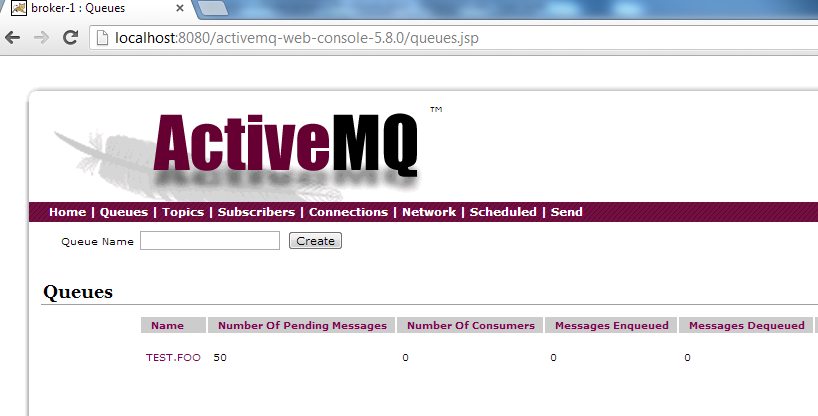
Here is the web console showing 50 messages enqueued.
Don't bother the #Messages Enqueued = 0 in the above screenshot. This count represents the number of messages enqueued since this node started. Since I had restarted the node after the 50 messages were already enqueued, the count shows as 0.
Now lets try to consume these messages using an asynchronous consumer using ActiveMQ connection factory with failover protocol.
Here is simple asynchronous consumer with ActiveMQConnectionFactory using failover protocol.
package com.akuntamukkala.amqms;

import javax.jms.Connection;
import javax.jms.Destination;
import javax.jms.JMSException;
import javax.jms.Message;
import javax.jms.MessageConsumer;
import javax.jms.MessageListener;
import javax.jms.Session;
import javax.jms.TextMessage;

import org.apache.activemq.ActiveMQConnectionFactory;
import org.apache.log4j.Logger;

public class Consumer implements MessageListener {

	private static final Logger log = Logger.getLogger(Consumer.class);

	public static void main(String[] args) throws Exception {

		ActiveMQConnectionFactory connectionFactory = new ActiveMQConnectionFactory(
				"failover:(tcp://localhost:61616,tcp://localhost:61626)");

		// Create a Connection
		Connection connection = connectionFactory.createConnection();
		connection.start();

		// Create a Session
		Session session = connection.createSession(false,
				Session.AUTO_ACKNOWLEDGE);

		// Create the destination (Topic or Queue)
		Destination destination = session.createQueue("TEST.FOO");

		// Create a MessageConsumer from the Session to the Queue
		MessageConsumer consumer = session.createConsumer(destination);
		consumer.setMessageListener(new Consumer()); // asynchronous listener
		Thread.sleep(120000); // long wait to keep program running
		consumer.close();
		session.close();
		connection.close();

	}

	/**
	 * asynchronous message listener
	 */
	public void onMessage(Message message) {
		try {
			log.info(((TextMessage) message).getText());
			Thread.sleep(500);
		} catch (JMSException e) {
			log.error(e);
		} catch (InterruptedException e) {
			log.error(e);
		}
	}

}
Here are the logs from the execution. I switched the master nodes a few times as evident in the logs.
2013-07-10 11:46:01 INFO  FailoverTransport:1030 - Successfully connected to tcp://localhost:61616
2013-07-10 11:46:01 INFO  Consumer:49 - Message Counter : 0
2013-07-10 11:46:02 INFO  Consumer:49 - Message Counter : 1
2013-07-10 11:46:02 INFO  Consumer:49 - Message Counter : 2
2013-07-10 11:46:03 INFO  Consumer:49 - Message Counter : 3
2013-07-10 11:46:03 INFO  Consumer:49 - Message Counter : 4
2013-07-10 11:46:04 INFO  Consumer:49 - Message Counter : 5
2013-07-10 11:46:04 INFO  Consumer:49 - Message Counter : 6
2013-07-10 11:46:05 INFO  Consumer:49 - Message Counter : 7
2013-07-10 11:46:05 INFO  Consumer:49 - Message Counter : 8
2013-07-10 11:46:06 INFO  Consumer:49 - Message Counter : 9
2013-07-10 11:46:06 INFO  Consumer:49 - Message Counter : 10
2013-07-10 11:46:07 INFO  Consumer:49 - Message Counter : 11
2013-07-10 11:46:07 WARN  FailoverTransport:255 - Transport (tcp://127.0.0.1:61616) failed, reason:  java.io.EOFException, attempting to automatically reconnect
2013-07-10 11:46:18 INFO  FailoverTransport:1032 - Successfully reconnected to tcp://localhost:61626
2013-07-10 11:46:18 WARN  ActiveMQMessageConsumer:1348 - Duplicate dispatch on connection: ID:AKUNTAMU-1-2141-1373474760280-1:1 to consumer: ID:AKUNTAMU-1-2141-1373474760280-1:1:1:1, ignoring (auto acking) duplicate: MessageDispatch {commandId = 0, responseRequired = false, consumerId = ID:AKUNTAMU-1-2141-1373474760280-1:1:1:1, destination = queue://TEST.FOO, message = ActiveMQTextMessage {commandId = 5, responseRequired = true, messageId = ID:AKUNTAMU-1-1739-1373473592152-1:12:1:1:1, originalDestination = null, originalTransactionId = null, producerId = ID:AKUNTAMU-1-1739-1373473592152-1:12:1:1, destination = queue://TEST.FOO, transactionId = null, expiration = 0, timestamp = 1373473603281, arrival = 0, brokerInTime = 1373473603281, brokerOutTime = 1373474778676, correlationId = null, replyTo = null, persistent = true, type = null, priority = 4, groupID = null, groupSequence = 0, targetConsumerId = null, compressed = false, userID = null, content = null, marshalledProperties = null, dataStructure = null, redeliveryCounter = 0, size = 0, properties = null, readOnlyProperties = true, readOnlyBody = true, droppable = false, text = Message Counter : 11}, redeliveryCounter = 0}
2013-07-10 11:46:18 INFO  Consumer:49 - Message Counter : 12
2013-07-10 11:46:19 INFO  Consumer:49 - Message Counter : 13
2013-07-10 11:46:19 INFO  Consumer:49 - Message Counter : 14
2013-07-10 11:46:20 INFO  Consumer:49 - Message Counter : 15
2013-07-10 11:46:20 INFO  Consumer:49 - Message Counter : 16
2013-07-10 11:46:21 INFO  Consumer:49 - Message Counter : 17
2013-07-10 11:46:21 INFO  Consumer:49 - Message Counter : 18
2013-07-10 11:46:22 INFO  Consumer:49 - Message Counter : 19
2013-07-10 11:46:22 INFO  Consumer:49 - Message Counter : 20
2013-07-10 11:46:23 INFO  Consumer:49 - Message Counter : 21
2013-07-10 11:46:23 INFO  Consumer:49 - Message Counter : 22
2013-07-10 11:46:24 INFO  Consumer:49 - Message Counter : 23
2013-07-10 11:46:24 INFO  Consumer:49 - Message Counter : 24
2013-07-10 11:46:25 INFO  Consumer:49 - Message Counter : 25
2013-07-10 11:46:25 INFO  Consumer:49 - Message Counter : 26
2013-07-10 11:46:26 INFO  Consumer:49 - Message Counter : 27
2013-07-10 11:46:26 INFO  Consumer:49 - Message Counter : 28
2013-07-10 11:46:27 INFO  Consumer:49 - Message Counter : 29
2013-07-10 11:46:27 INFO  Consumer:49 - Message Counter : 30
2013-07-10 11:46:28 INFO  Consumer:49 - Message Counter : 31
2013-07-10 11:46:28 INFO  Consumer:49 - Message Counter : 32
2013-07-10 11:46:29 INFO  Consumer:49 - Message Counter : 33
2013-07-10 11:46:29 INFO  Consumer:49 - Message Counter : 34
2013-07-10 11:46:30 INFO  Consumer:49 - Message Counter : 35
2013-07-10 11:46:30 INFO  Consumer:49 - Message Counter : 36
2013-07-10 11:46:31 INFO  Consumer:49 - Message Counter : 37
2013-07-10 11:46:31 INFO  Consumer:49 - Message Counter : 38
2013-07-10 11:46:32 INFO  Consumer:49 - Message Counter : 39
2013-07-10 11:46:32 WARN  FailoverTransport:255 - Transport (tcp://127.0.0.1:61626) failed, reason:  java.io.EOFException, attempting to automatically reconnect
2013-07-10 11:46:43 INFO  FailoverTransport:1032 - Successfully reconnected to tcp://localhost:61616
2013-07-10 11:46:43 WARN  ActiveMQMessageConsumer:1348 - Duplicate dispatch on connection: ID:AKUNTAMU-1-2141-1373474760280-1:1 to consumer: ID:AKUNTAMU-1-2141-1373474760280-1:1:1:1, ignoring (auto acking) duplicate: MessageDispatch {commandId = 0, responseRequired = false, consumerId = ID:AKUNTAMU-1-2141-1373474760280-1:1:1:1, destination = queue://TEST.FOO, message = ActiveMQTextMessage {commandId = 5, responseRequired = true, messageId = ID:AKUNTAMU-1-1739-1373473592152-1:40:1:1:1, originalDestination = null, originalTransactionId = null, producerId = ID:AKUNTAMU-1-1739-1373473592152-1:40:1:1, destination = queue://TEST.FOO, transactionId = null, expiration = 0, timestamp = 1373473658595, arrival = 0, brokerInTime = 1373473658599, brokerOutTime = 1373474803745, correlationId = null, replyTo = null, persistent = true, type = null, priority = 4, groupID = null, groupSequence = 0, targetConsumerId = null, compressed = false, userID = null, content = null, marshalledProperties = null, dataStructure = null, redeliveryCounter = 0, size = 0, properties = null, readOnlyProperties = true, readOnlyBody = true, droppable = false, text = Message Counter : 39}, redeliveryCounter = 0}
2013-07-10 11:46:43 INFO  Consumer:49 - Message Counter : 40
2013-07-10 11:46:44 INFO  Consumer:49 - Message Counter : 41
2013-07-10 11:46:44 INFO  Consumer:49 - Message Counter : 42
2013-07-10 11:46:45 INFO  Consumer:49 - Message Counter : 43
2013-07-10 11:46:45 INFO  Consumer:49 - Message Counter : 44
2013-07-10 11:46:46 INFO  Consumer:49 - Message Counter : 45
2013-07-10 11:46:46 INFO  Consumer:49 - Message Counter : 46
2013-07-10 11:46:47 INFO  Consumer:49 - Message Counter : 47
2013-07-10 11:46:47 INFO  Consumer:49 - Message Counter : 48
2013-07-10 11:46:48 INFO  Consumer:49 - Message Counter : 49
Let's check out the ActiveMQ web console:
You may find the # Messages Dequeued = 11 very interesting. This is the number of messages dequeued from the current ActiveMQ master node since it started.
Conclusion:
We have thus seen the following in action:
- Run 2 ActiveMQ nodes in a Master/Slave configuration with a shared KahaDB file based database.
- Configure ActiveMQ web console hosted in a Tomcat instance to point to whichever node is Master node in the cluster
- Failover scenario
- Message publisher and consumer behavior oblivious to the failover
In future blogs, I will post some other interesting ActiveMQ configurations. Stay tuned.
Happy ActiveMQ'ing!
References:
- http://activemq.apache.org/
- http://www.jakubkorab.net/category/technology/activemq